Thank you to Lisa who contacted developer on the exception.
From Google execution log, the setup function submitted the createTemplateForm twice. The exception came from the 2nd submission.

Add-ons have been updated to ignore the 2nd submission.

Thank you to Lisa who contacted developer on the exception.
From Google execution log, the setup function submitted the createTemplateForm twice. The exception came from the 2nd submission.
The web app sign-in page has been updated below to clarify the purpose and scope of access:
Why Sign In?
Signing in with your Google account allows the web app owner to know who’s using it. Google controls the access and won’t share your Gmail, Drive, or other app data with this web app. Your data stays private and secure.
Pivot Expense Split can now support personal income and expenses. Please find the template in the setup page.
This template has the following features:
1. Input tab supports multiple entries. After entering the transaction, ticking the checkbox will submit.
If column G (frequency) is not empty, only the amount will be cleared.

Please note that checkbox is reserved for submitting the transaction entry.
2. User can define the account, category and currency in tables for the transaction input:


Pivot Expense Split can now support household income and expenses. Please find the template in the setup page.
This template has the following features:
1. Input tab supports multiple entries. After entering the transaction, ticking the checkbox will submit.
If column J (frequency) is not empty, only the amount will be cleared.

Please note that checkbox is reserved for submitting the transaction entry.
2. User can define the account, category and currency in tables for the transaction input:

For group of attendees coming together, Comfort Attendance displayed them in a row so that greeter can take attendance for all of them quickly.
When an attendee brings in guests, greeter can use the + icon on the left hand side of the attendee to input guests.
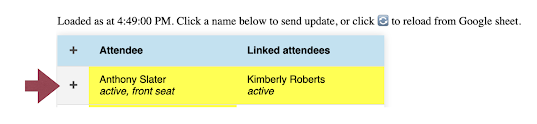
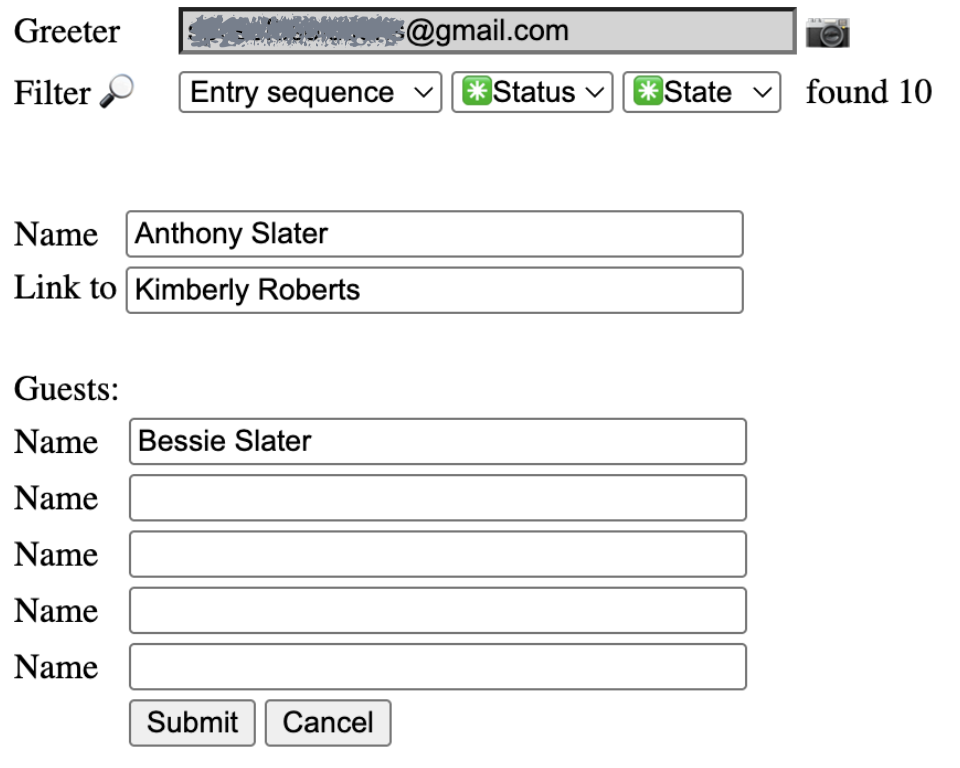

Anthony and Bessie will be updated as present automatically.
Next time, greeter may not remember Bessie. Greeter can look up Anthony's row and recall Bessie to check them in together.
Our new Google sheet add-on Pivot Expense Split has been approved by the Google Workspace Marketplace today.


